Deixis: the agent points
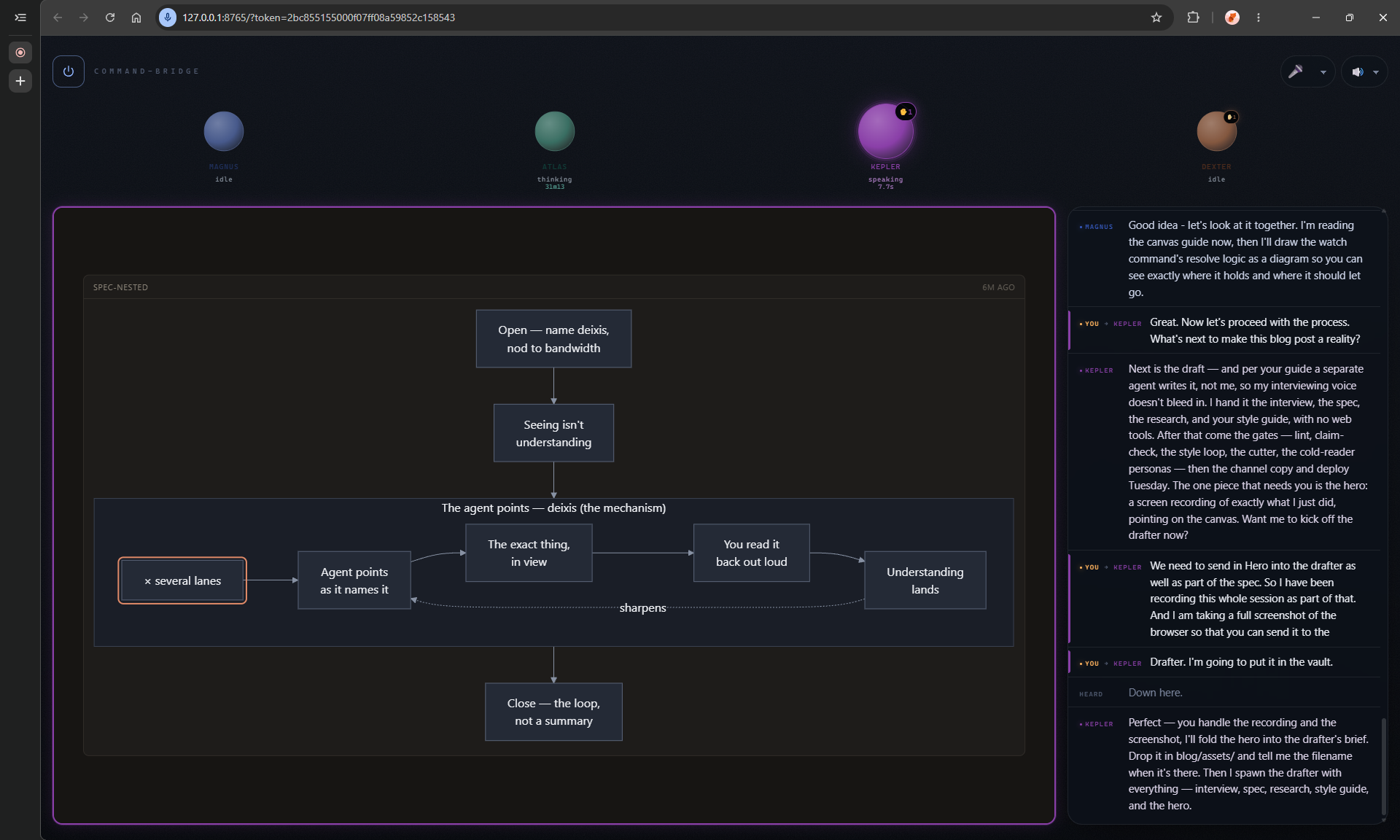
Deixis is context-dependent reference, words like “this”, “that”, “here” and “then” get their meaning from the situation in which they’re used. Pointing can supply that context. You can’t know what any of them mean without knowing what the speaker is gesturing at. Pointing is how humans establish joint attention, two people locked onto the same thing and both aware that they are looking at it.
I’ve been exploring how to increase the bandwidth between me and my agents, how much intent I can transmit and how much I can truly understand of what comes back. I work with AI every day, for coding, research, writing, in my second brain, basically everything. The newest iteration on increasing this bandwidth is the agent pointing at the exact element on a shared canvas while it explains it.
Seeing isn’t understanding
In my previous post, “show me” was the last step that let the agent put the actual output in front of me. I built voice-tunnel for two-way audio with my coding agents, but it was lacking this “show me” step, Command Bridge was the natural evolution of that, so several agents could talk to me and drive a shared canvas to show me stuff.
When the agent and I are trying to line up on an idea, how a system is shaped, what a plan is going to do, a diagram is a thousand times better than a wall of text. Larkin and Simon showed why back in 1987, a diagram pays off when the bottleneck is spatial, when seeing the relationships saves you the inference. Aligning on a concept is the spatial case.
But a diagram in a canvas is still a diagram you have to decode in your mind to understand it. I’m the one looking at the boxes and the arrows the agent drew, and I’m the one turning them back into understanding. If I can’t tell which box the agent is talking about, I have to spend a turn on realigning the agent before we can discuss what that box means. That takes bandwidth away from understanding the idea.
Deixis
So, the agent draws the concept and points at the exact element as it names it. The box lights up on the mention, so I can follow the explanation with my attention already on the right element of the diagram.
The timing has to be exact. The highlight has to hit on the word or just before it, never after. David McNeill measured hand gestures against speech and found the stroke leads the stressed syllable, and a 2024 motion-capture study found early or synchronized gestures help recall while late ones hurt it. A mark that fires a beat late points at the wrong word and reads as noise, so Command Bridge drives the highlight off the measured word timings instead of guessing them.
None of this is new as an idea. Richard Bolt’s Put-That-There wired voice and pointing together at a screen in 1980, “put that there” only works because the gesture pins down what “that” and “there” mean. Command Bridge is the version where the agent is the one pointing, on a canvas it drew itself.
Multiple lanes
Voice Tunnel only worked with one agent, and that meant I was often waiting 30 to 45 seconds between turns while it read files, executed code, reasoned, etc. I needed a way to reduce my idle time in between turns.
Command Bridge allows running multiple agents on the same bridge with named lanes, e.g. kepler, atlas, magnus, dexter across the top of the screen. I can switch to kepler’s lane and give it something to work on, then switch to atlas while kepler thinks, and follow atlas’s explanation on its canvas. Each lane keeps its agent’s current state visible in the canvas when I return to it, so I can pick up the context from the screen.
That makes switching between tasks easier. I don’t have to hold every diagram and every agent’s last explanation in memory while I’m working with another. I can come back to a lane, hear the agent’s explanation, see what the agent is working on, and have it point at the part it needs to discuss.
This feels like managing a team live on a command-bridge. I’m keeping each agent unblocked and making sure I understand where it’s going so that we stay aligned and making progress.
The loop
I like to work with 3 to 6 agents at the same time and I try to make sure I divide my attention equally across all agents and that I keep them all busy most of the time.
So, I start command bridge, fire up the agents, start giving them instructions to read my second brain, scan code, etc, and come back to me with a short explanation of what it understands from reading all that. While that agent is off doing all those activities, I switch to the next and dispatch that same task, and so on with the rest of agents. When the first agent is done with its report, it will raise its hand in its lane and will have an explanation waiting for me, I switch back to its lane, hear and see its explanation to see if the agent is aligned, if not, I provide feedback and let it work for some time while I see the other agents’ reports. That way I can multi-task and keep myself and the agents busy while being able to pick up the context of what each lane is working on quickly, both visually and auditorially.
I believe this is the future of interacting with the AI, text in and text out was just the beginning, two-way audio conversations was the next step, deixis is the current step and I believe there’s still room to continue pushing new ways of increasing the bandwidth between us and our AIs.