Launching ccburn-mod: Your Token Burn-Up Chart, Inside Claude Code
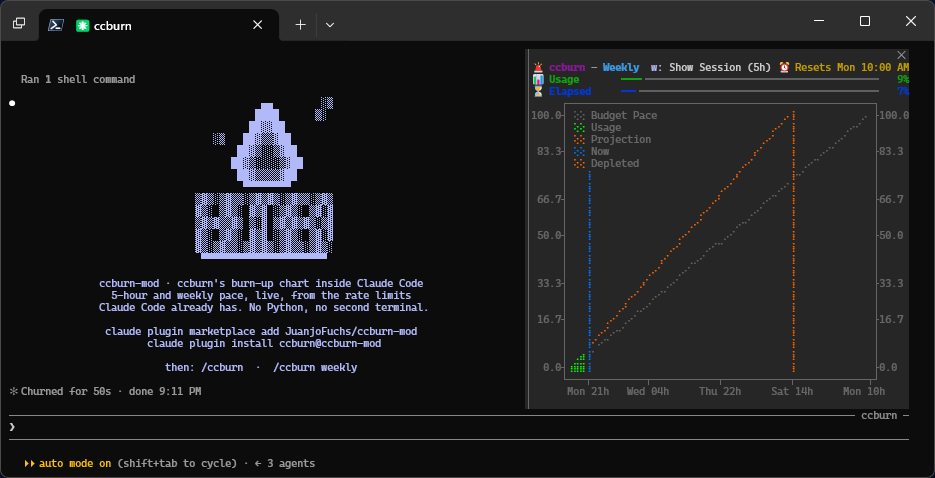
ccburn inside Claude Code
Claude Code launched mods recently and I’ve ported ccburn to one, so Claude Code now renders the chart of your usage window right inside it.
I introduced ccburn as a terminal tool for reading Claude Code limits as burn-up charts. It shows your five-hour and weekly windows, your pace and when you’re projected to run out. Its compact single-line mode already fits in Claude Code’s status line. I wanted the chart itself in there, and it’s pretty cool seeing it render in a Claude Code pane.
ccburn-mod keeps the chart in the session where I’m working, without a second terminal to watch.
Getting the readings from the engine
With ccburn, I had to put ccburn collect in Claude Code’s status line because the tool couldn’t access the engine’s rate-limit readings. The OAuth usage API frequently returns HTTP 429 rate-limit errors, and Claude Desktop cookies only cover the default profile. ccburn collect reads the rate_limits JSON sent to the status line and saves it locally, so ccburn can build its chart from those readings.
Now Claude Code hands the readings to the mod through $.session.usage(). These example values show just the rateLimits part of its response:
{
  "rateLimits": [
    {
      "kind": "five_hour",
      "percentUsed": 45.0,
      "resetsAt": "2026-10-06T18:00:00Z"
    },
    {
      "kind": "seven_day",
      "percentUsed": 12.5,
      "resetsAt": "2026-10-12T14:00:00Z"
    }
  ]
}
That gives the chart the percentage used and the reset time for each window. The session.measure event pushes those readings after each turn in the session, so the mod can record the new point and redraw. The mod needs nothing else: no Python, no usage API calls and no separate login.
Claude Code only gives a session its own readings, though. A session you’re not typing in stops updating, even while your other sessions keep spending the same account. If you also have ccburn installed, the mod reads the history ccburn records from all your sessions, so the chart stays current in a session that’s sitting idle.
Porting the chart to TypeScript
ccburn is written in Python, and plotext draws its chart. I ported it to TypeScript, and it was rather easy. The port spec came down to about 150 lines of pure math plus the chart layout.
The port draws through Claude Code’s Raster element, a grid of characters and colors, because a mod pane can’t accept ccburn’s terminal output.
Addy Osmani, who works on Claude Code at Anthropic, wrote: “To make your agent produce high-quality output, equip it with a way to check its work.” I already had ccburn, so the agent generated six golden charts, reference charts rendered by the original ccburn. It used fixed inputs and a pinned clock, then checked its TypeScript port against the golden charts cell for cell, including each character and its color.
The first test against the golden charts caught a fill bug that reading plotext’s source had missed. The port treated the fill level as 1, while the real program normalized fillx=True to 0. All six golden chart tests passed after the fix.
Testing in a real pane
Every test passed, and the first live run still said Pane too small for chart. An inline pane was only as tall as what it drew, so the error message kept the pane too small to draw anything else. The fix was to draw tall once, measure the room the engine actually gave it, then fit the chart into that space.
The agent used herdr, the tool I use to run agents in terminal panes, to type /ccburn into another pane and read it back. --plugin-dir loads the mod from a local folder and reloads it on save, so the agent could check each change in the running session. Each fix became a two-minute loop it could run without asking me to type commands and report back. That also caught a duplicated command prefix and a header that wrapped in narrow panes.
The live test also showed that an idle session’s usage line froze while other sessions spent the account. The mod only gets readings from its own session’s replies. The agent tried polling through a model call, which left the readings stale. The fix used ccburn 0.8.0’s ccburn history --json to share readings saved by ccburn collect in each session’s status line. The mod reads that shared history every minute when ccburn is installed.
Install and try it
In your terminal:
claude plugin marketplace add JuanjoFuchs/ccburn-mod
claude plugin install ccburn@ccburn-mod
Then inside Claude Code:
/ccburn         # Five-hour window
/ccburn weekly  # Weekly window
Tip: To keep an idle pane current, install ccburn 0.8.0+ and put ccburn collect in each session’s status line.
It needs a Pro, Max or Team subscription because Claude Code doesn’t supply rate-limit windows for Enterprise or API accounts. It’s early, and the mod is built against Claude Code 2.1.289’s early-access mod API.
If you try it, I’d love to hear how it goes in the ccburn-mod repo.